
GearCalc – Bicycle Gear Calculator for Mac and iPad
Understanding your bike’s gearing shouldn’t require a spreadsheet and a degree in mathematics. GearCalc is a native Mac and iPad app that does the hard work for you — giving you instant, detailed analysis of every gear combination on your bike, presented in a clear and intuitive interface.
Whether you’re a road cyclist weighing up a cassette swap, a gravel rider optimising for a loaded adventure, or a triathlete dialling in your setup for race day, GearCalc gives you the numbers you need to make informed decisions.
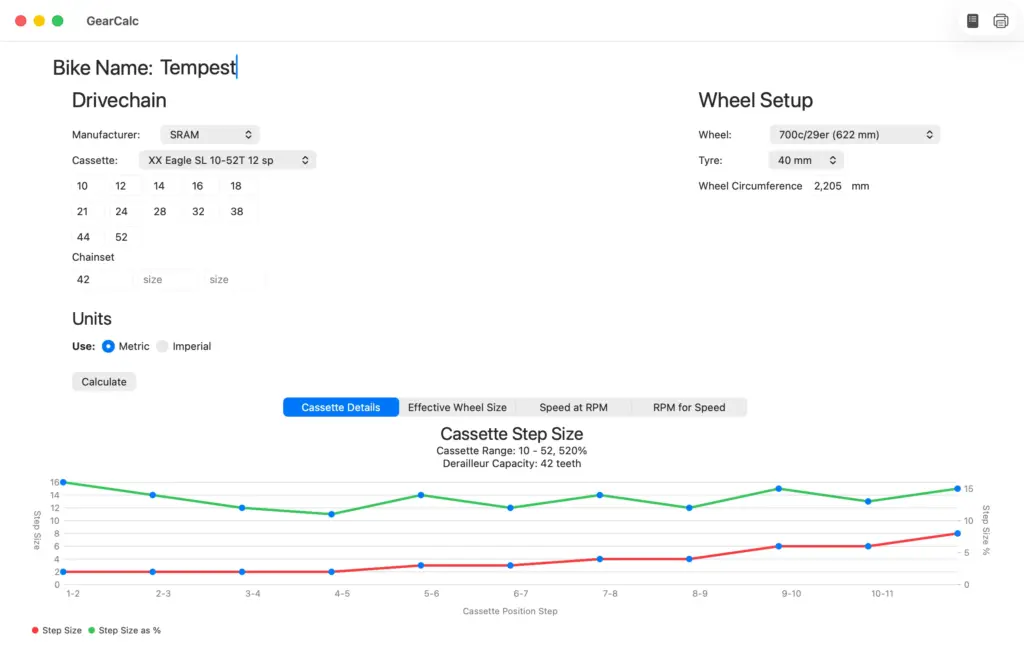
What Does GearCalc Do?
At its core, GearCalc is a tool for comparing and understanding gear setups. You tell it about your bike — the chainring size, cassette, wheel, and tyre — and it instantly calculates the full picture of your drivetrain, across every single gear combination.
The results are displayed in clear tabular and graphical form, so you can see at a glance how your gearing works in practice — not just in theory.
How Bike Gears Are Measured
There are two standard ways of expressing a gear ratio, and GearCalc calculates both:
Effective Wheel Size
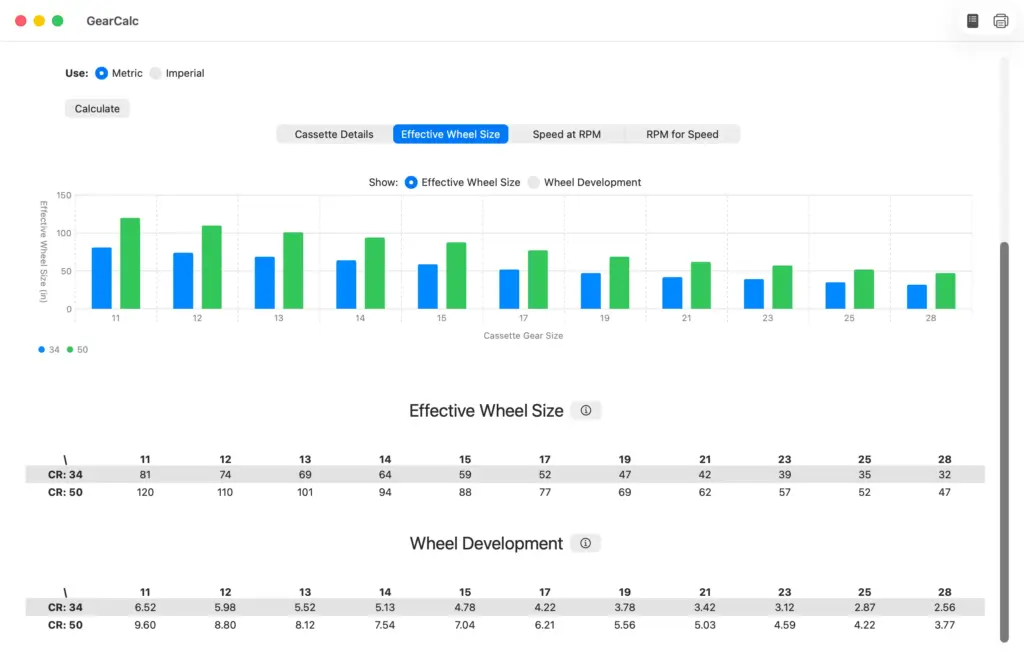
Effective Wheel Size is based on the diameter of a wheel that would give the same forward movement per pedal revolution as your current gear combination. It’s rooted in the concept of the old high-wheel “Penny Farthing” bicycle, where the wheel was directly connected to the pedals — a bigger wheel meant a higher gear. This measurement is expressed in inches.
Gear Development
Gear Development (sometimes called Wheel Development) is the distance the bike moves forward with each complete turn of the cranks. It’s simply the circumference of the equivalent wheel from the Effective Wheel Size calculation, expressed in metres.
Both calculations are based on the actual circumference of your wheel and tyre. GearCalc uses the following formula:
Circumference = (Wheel Diameter + (2 × Tyre Diameter)) × π
This assumes the tyre forms a perfect circle when inflated, using the wheel’s bead diameter as the baseline. In practice, the actual circumference can vary slightly depending on tyre width, inflation pressure, and whether the manufacturer’s stated size is precise — but for the purposes of gear comparison, this calculation is both standard and accurate.
The Full Feature Set
Cassette Details
GearCalc displays the complete tooth count for every sprocket in your cassette, along with the step between each gear — both as an absolute tooth difference and as a percentage of the smaller gear. This gives you a clear sense of how evenly spaced (or otherwise) your gear jumps are.
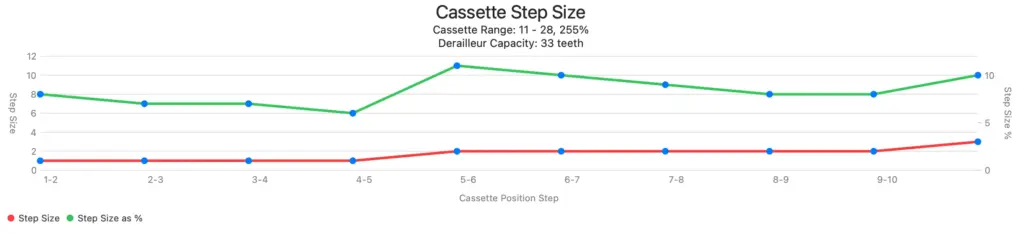
The cassette spacing chart was inspired by a visualisation I first saw in Campagnolo’s catalogues — it’s a remarkably useful way of seeing at a glance where the big jumps in your cassette are, and how that affects your ability to maintain a consistent cadence.
Effective Wheel Size and Gear Development Table
The full results table shows the Effective Wheel Size and Gear Development for every combination of chainring and sprocket on your bike. If you’re running a double chainset and an 11-speed cassette, that’s 22 gear combinations — all calculated and laid out for easy comparison.
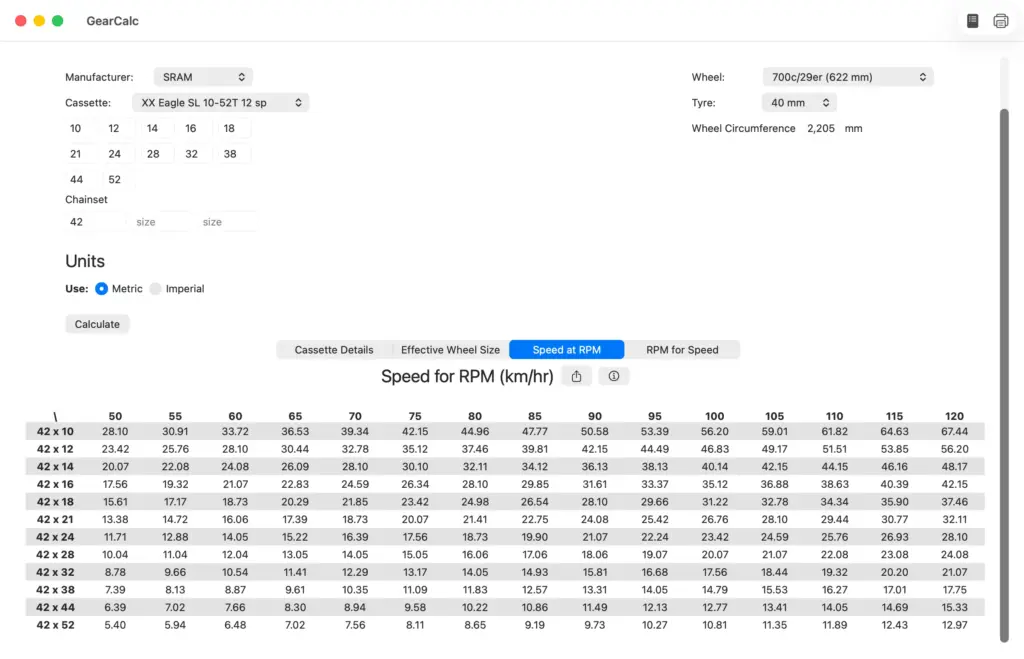
Speed at Cadence
One of the most practically useful views in GearCalc: for every gear combination, you can see the speed you’ll be travelling at a given pedalling cadence (RPM). Cadence values outside the normal physiological range — below 60 RPM or above 120 RPM — are highlighted in red, giving you an immediate visual indication of which gears are effectively unusable at normal effort levels.
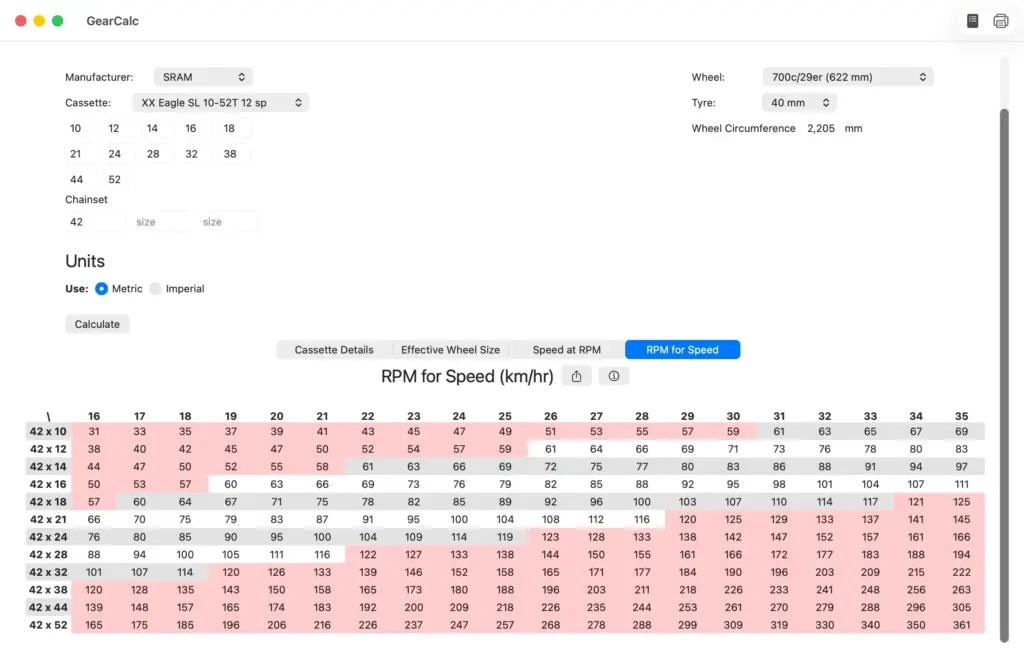
Cadence for Speed
The flip side of the calculation above: for a given target speed, GearCalc shows the cadence you’d need to sustain in each gear. This is particularly useful when planning for specific scenarios — a long climb, a fast descent, a steady time trial effort — and want to know which gear puts you in the most efficient cadence range.
Gear Range Bar Chart
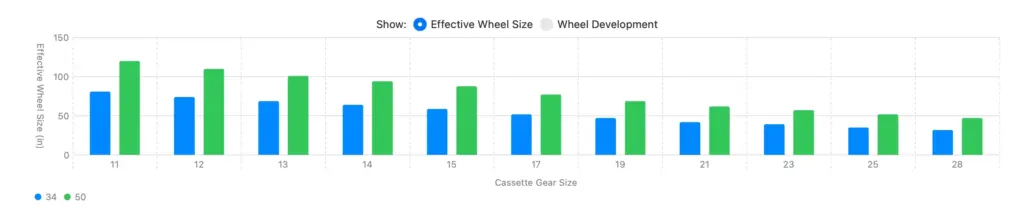
A visual representation of your gear range — the Effective Wheel Size for each gear combination, displayed as a bar chart. This makes it immediately obvious how much overlap there is between your chainrings, and where the gaps in your gearing are.
CSV Export
All of GearCalc’s tables can be exported as CSV files, making it easy to do further analysis in a spreadsheet, share data with a coach, or keep a record of different bike setups.
Setting Up Your Bike in GearCalc
Getting started takes only a few seconds:
- Select your cassette — choose from the built-in library of cassette data from the most popular manufacturers, or enter your sprocket sizes manually if yours isn’t listed
- Enter your chainring sizes — type in the tooth count for each chainring on your bike
- Select your wheel size — choose from the standard wheel sizes in the dropdown
- Select your tyre size — choose from the standard tyre sizes, or enter a custom circumference if you know it
Hit Calculate, and the results appear instantly.
GearCalc includes pre-populated data for the most common cassette manufacturers and standard wheel and tyre sizes, so for most bikes the setup is simply a matter of selecting from the available options.
Saving Your Bikes
If you’re analysing multiple bikes, or comparing different cassette options for the same bike, GearCalc lets you save your configurations. Each saved bike stores all your input settings — cassette, chainrings, wheel, and tyre — so you can switch between setups instantly without re-entering everything from scratch.
A Note on Accuracy
GearCalc’s calculations are based on well-established, standard methods used across the cycling industry. The Effective Wheel Size and Gear Development figures assume a perfectly circular tyre cross-section and use the manufacturer’s stated tyre dimensions — the same assumptions used by every other gear calculator.
In real-world use, the actual distance covered per pedal revolution will vary slightly depending on tyre pressure, load, surface, and manufacturing tolerances. For the purposes of comparing gear setups and making decisions about cassette choices or chainring sizes, however, the calculations are accurate and consistent.
Who Is GearCalc For?
Road cyclists choosing between cassette options, or wondering whether to run a compact or standard chainset.
Gravel and adventure riders finding the right gear range for loaded touring or rough terrain.
Triathletes and time triallists optimising their gearing for a specific course or target speed.
Track cyclists working out gear inch requirements for an event.
Anyone building or upgrading a bike who wants to understand what their drivetrain will actually feel like before committing to a purchase.
If you’ve ever wondered “what gear am I actually in?” — or more usefully, “what gear should I be in?” — GearCalc will give you the answer.
Other Gear Calculators
GearCalc isn’t the only gear calculator out there, and I’d be doing you a disservice not to mention some of the others:
- Sheldon Brown’s Gear Calculator — a classic, and the source of much of the foundational thinking on bicycle gear measurement. Sheldon also proposed the Gain Ratio, which takes crank length into account — something I may add to GearCalc in a future version.
- Roy Walter’s Bike Calc — a solid and comprehensive calculator.
- BikeCalc.com — straightforward calculations with good explanations of the terminology.
- RideFar Gear Ratio Guide — particularly useful if you’re a bikepacker or gravel rider choosing gearing for loaded touring.
What GearCalc offers that these don’t is a native Mac and iPad experience — fast, offline, with a clean interface designed for the platform, and the ability to save and compare multiple bike setups.
Availability
GearCalc is currently undergoing testing and is available for Mac OS and IPadOS through Apple’s TestFlight application. If you’d like to join the test program, use this link – https://testflight.apple.com/join/RUJbjDW3
Contact and Support
If you have any questions, comments or bug reports about the app, please contact me: stuart@stuarttevendale.com
Privacy
GearCalc does not store any personal information. No information from any of the data you enter is shared.
GearCalc is developed by Stuart Tevendale. For other apps, see the Apps page.